Free Plumbing Estimate Template
Good, better and best on one page. Type what the parts cost you and the estimate prices them, adds labor, haul-away, permit and tax on parts, and totals each option. Your costs never print.
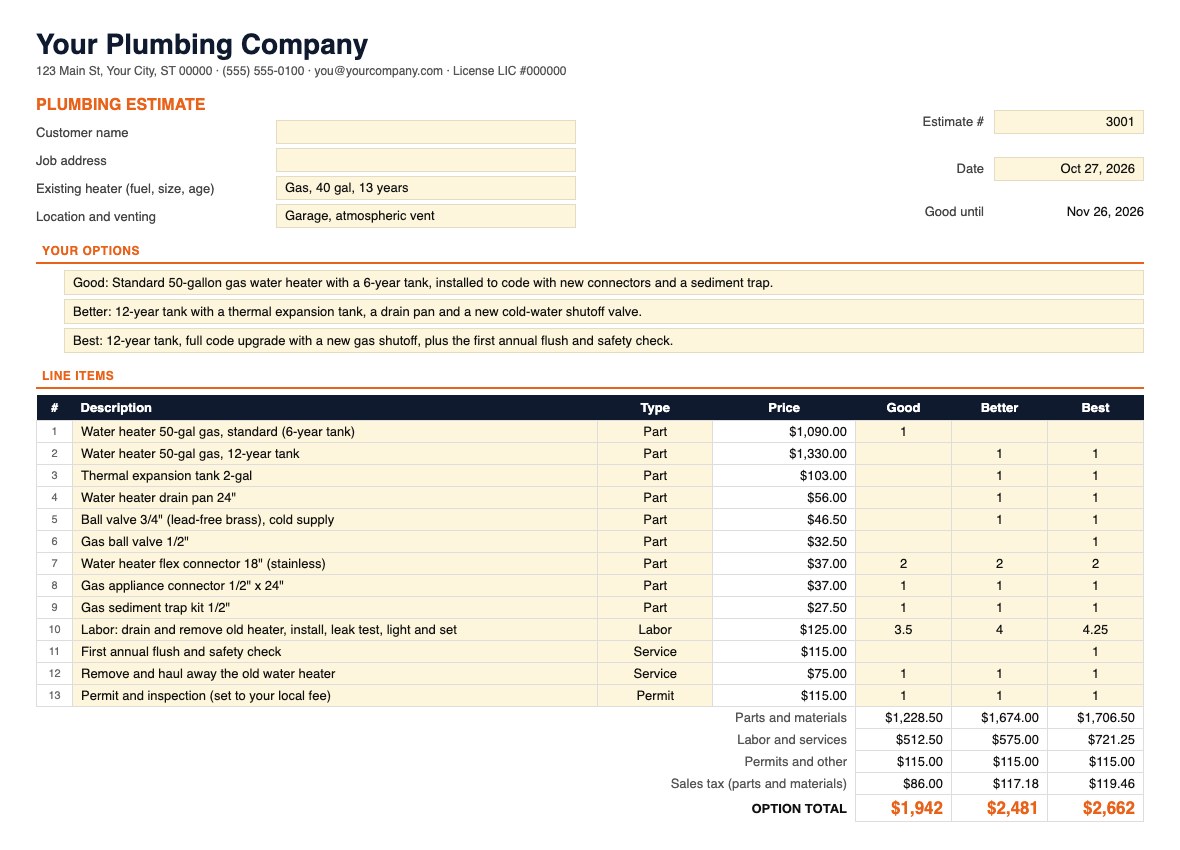
A Plumbing Estimate Template With Good, Better and Best Built In
Most free plumbing estimate templates are a blank table with one total. Water heaters, toilets and sump pumps sell better in options, and writing three estimates by hand is slow. This template puts three options on one page: list every item once, set a quantity for each option, and each option gets its own total.
It also does the pricing. Type what a part costs you and it charges the price on the same sliding markup as our free plumbing price book, so a $10 sediment trap carries a bigger markup than an $890 tank. Labor bills at your hourly rate, haul-away and other services at the price you set, permits at the fee plus 15%, and tax is charged on parts only. Your margin on each option is worked out beside the estimate and never prints.
The file is free and downloads straight away, no email needed. It opens in Excel, Google Sheets and Numbers. For the prices behind it, see the free plumbing price book (45 repairs with hours and parts).
What's in the Plumbing Estimate Template
Three tabs. Amber cells are inputs; the rest are protected formulas (Review › Unprotect Sheet, no password, if you want to change one).
Start Here
Four steps: Settings, describing the options, pricing the lines, and printing.
Settings
Company block and license number. Labor rate ($125 an hour), after-hours rate ($190), your labor cost ($87, for the margin only), sales tax (7%), diagnostic fee ($99) and how many days the estimate is good for (30). The parts sliding scale: seven costs from $2 to $5,000 with a multiplier for each. Pipe by the foot (1.6 times cost) and the permit markup (15%).
Estimate
Estimate number, date, prepared by and a good-until date worked out from Settings. Customer, job address, the existing heater (fuel, size, age) and where it sits and how it vents. Three option descriptions, 24 line items with a type dropdown (Part, Pipe, Service, Permit, Labor, After-hours, Fee, Other) and a quantity column for Good, Better and Best, then each option's parts, labor and services, permits, sales tax and total. An Approval box with the option chosen, its total, a signature and a date, and editable terms.
Beside the estimate
To the right of the print area: Your cost or rate (amber, where you type costs), Markup (filled in from the scale, type over it for one line), Unit cost, and the margin on each option. None of it prints.
How to Fill In the Plumbing Estimate
- 1
Set your rates once
Labor and after-hours rates, diagnostic fee, tax rate and how long estimates stay good, on the Settings tab. Change the sliding scale only if you price parts differently.
- 2
Fill in the header
Estimate number, date, who prepared it, the customer and job address. Note the existing heater's fuel, size and age, where it sits and how it vents: those decide whether the Better and Best code items apply.
- 3
Write the three options
One line each, in words the customer understands: what they get and how long the tank is warranted, not part numbers. Good is the job done to code; Better and Best add what protects the house and the new heater.
- 4
Price the lines
Pick a type and type your cost in the amber Your cost column; the price fills in. Service lines take the price you charge. Labor lines take hours; leave the rate blank and Settings supplies it.
- 5
Set quantities per option
For each line, type the quantity under Good, Better and Best. Blank means that option doesn't include it. The totals under each column update as you go, and the margin for each option shows beside the estimate.
- 6
Set the permit
The permit line starts at a $100 placeholder. Most US cities require a permit to replace a water heater, and a gas unit can need a gas or mechanical permit too, so type your city's fee.
- 7
Print, then get it signed
The print area is the customer estimate, so File › Print or Save as PDF gives a clean page with no costs on it. When the customer picks, set Option chosen; the total for that option fills in next to the signature.
Worked Example: A 50-Gallon Gas Water Heater
This is the estimate as it downloads: the starting Settings ($125 an hour, 7% sales tax) and the three water heater options from our plumbing price book, with part costs at supply-house and retail level.
Margins beside the totals read 37% for Good, 38% for Better and 41% for Best, before tax, with labor counted at $87 an hour and parts and the permit at cost.
How that compares: HomeAdvisor puts a 50-gallon heater installed at $800 to $2,500, and SubcontractorHub's 2026 flat-rate guide lists $1,700 to $2,900 for a like-for-like 40 to 50-gallon swap, so the three options land in the middle of the published range.
Hours come from the price book: 3.5 for a like-for-like gas swap by one plumber (SubcontractorHub lists 3 to 4.5, Fixr 3 to 4), plus time for the expansion tank, pan and valves. Venting changes, moving the heater and gas line work are not included. The plumbing markup chart explains the sliding scale.
Plumbing Estimate Template FAQ
How does the plumbing estimate template price parts?
You type what a part or fixture costs you and the template prices it on a sliding scale: about 3 times cost for a $2 fitting, 2.5 times at $25, double at $100, 1.6 times at $500 and 1.3 times at $5,000, with costs in between read from the curve. Prices are rounded to the nearest 50 cents under $50, the nearest dollar under $500 and the nearest $5 above. These are the multipliers in our free plumbing price book, so the water heater, valves and connectors in the starting estimate price exactly as they do there.
How do the Good, Better and Best options work?
Every line is listed once, with a quantity column for each option. Leave a quantity blank and that line isn't in that option. Each column adds up to its own total, with parts and materials, labor and services, permits and sales tax shown separately, so the customer compares three complete prices on one page and picks one in the Approval box.
Will the customer see my costs?
Not on the printout. The estimate prints descriptions, prices, quantities and the three totals. Your cost, the markup and the margin for each option sit in columns to the right of the print area, so a printout or PDF never shows them. The spreadsheet file still holds them, so send the customer a PDF, not the file.
Can I use it for jobs other than a water heater?
Yes. The water heater is the starting example because it's the replacement plumbers most often sell in three options. Rewrite the three option lines, replace the line items with your own (24 rows) and set the quantities per option. A toilet replacement, a sump pump with a battery backup or a repipe all fit the same way.
What does the Service type do?
A Service line is charged at exactly the price you type, with no markup and no tax: hauling away the old heater ($75 to start) or a first annual flush ($115 in the Best option). Use Pipe for anything sold by the foot (1.6 times cost), Permit for the fee you'll pay plus 15%, and Labor or After-hours for hours, which bill at the Settings rates when you leave the rate blank.
Which lines are taxed?
Part and Pipe lines only, at the rate on Settings (7% to start). Labor, services, permits and fees are not taxed. Whether a plumber charges sales tax on a water heater or on repair parts depends on the state and on whether the job counts as a repair or an improvement to the home, so set the rate your state requires, or 0% if you don't collect it.
Related Guides and Calculators
Rather Quote From Your Phone?
EstimateKit quotes water heaters, tankless, toilets and sump pumps in good, better and best from your price book, sends the quote as a link the customer approves on their phone, and turns the choice into the job and the invoice. $49 a month for the whole crew, 14-day free trial, no card.
Start Free Trial