Free Plumbing Invoice Template
For service and repair calls. Type what a part cost you and the invoice charges the price. Labor, after-hours, the diagnostic fee and tax on parts only are built in, and your cost never prints.
A Plumbing Invoice Template That Prices the Parts for You
Most free plumbing invoice templates are a blank table: you work out every price yourself and hope you remembered the markup. This one does the pricing. Type what each part cost you and the invoice charges the price, using the same sliding markup as our free plumbing price book: cheap parts like a flapper or a supply line carry a bigger markup than a water heater does.
Labor bills at your hourly rate, or your after-hours rate for nights and weekends. The diagnostic fee, pipe by the foot and permits each have their own line type, tax is charged on parts and pipe only, and a plan member discount comes off with one dropdown. Your cost and margin are worked out as you go, beside the invoice, and never print.
The file is free and downloads straight away, no email needed. It opens in Excel, Google Sheets and Numbers. For the prices behind it, see the free plumbing price book (45 repairs with hours and parts).
What's in the Plumbing Invoice Template
Three tabs. Amber cells are inputs; the rest are protected formulas (Review › Unprotect Sheet, no password, if you want to change one).
Start Here
Four steps: Settings, adding charges, recording payment, and printing.
Settings
Company block and license number. Labor rate ($125 an hour), after-hours rate ($190), your labor cost ($87, for the margin only), sales tax (7%), diagnostic fee ($99) and plan member discount (10%). The parts sliding scale: seven part costs from $2 to $5,000 with a multiplier for each. Pipe by the foot (1.6 times cost) and the permit markup (15%).
Invoice
Status dropdown (Unpaid, Partial, Paid), invoice number, service date, technician, plan member (Yes or No), customer, service address, the fixture or equipment worked on, a work performed box, 14 charge lines with a type dropdown (Fee, Part, Pipe, Permit, Labor, After-hours, Other), and totals: parts and materials, labor and service fees, permits and other, member discount, sales tax, total, payment received and balance due.
Beside the invoice
To the right of the print area: Your cost or rate (amber, where you type part costs), Markup (filled in from the scale, type over it for one line), Cost total for each line, and the Margin on the whole invoice. None of it prints.
How to Fill In the Plumbing Invoice
- 1
Set your rates once
Labor and after-hours rates, diagnostic fee, tax rate and plan discount on the Settings tab. Change the sliding scale only if you price parts differently.
- 2
Fill in the header
Invoice number, service date, technician, customer, service address, and the fixture or equipment: the make and model of the water heater, faucet or toilet you worked on.
- 3
Write up the work
What was wrong, what you replaced or cleared, and what you tested. On drain calls, say where the blockage was and how far you ran the cable. It's the line that settles disputes.
- 4
Add charges
The fee line is already there. Add each part with the type Part and type your cost in the amber Your cost column; the price fills in. Pipe lines take the cost per foot and the feet as the quantity. Labor lines take the hours as the quantity; leave the rate blank and Settings supplies it.
- 5
Permits and other charges
A Permit line is the fee you paid plus 15%, untaxed. An Other line is charged at exactly the rate you type: a trip charge, a disposal fee, or a negative amount for a credit.
- 6
Plan members and payment
Set Plan member to Yes and the discount comes off parts, labor and fees. Enter what you collected in Payment received, then set the Status.
- 7
Print or save as PDF
The print area is the customer invoice, so File › Print or Save as PDF gives a clean page with no costs on it.
Worked Example: A Running Toilet
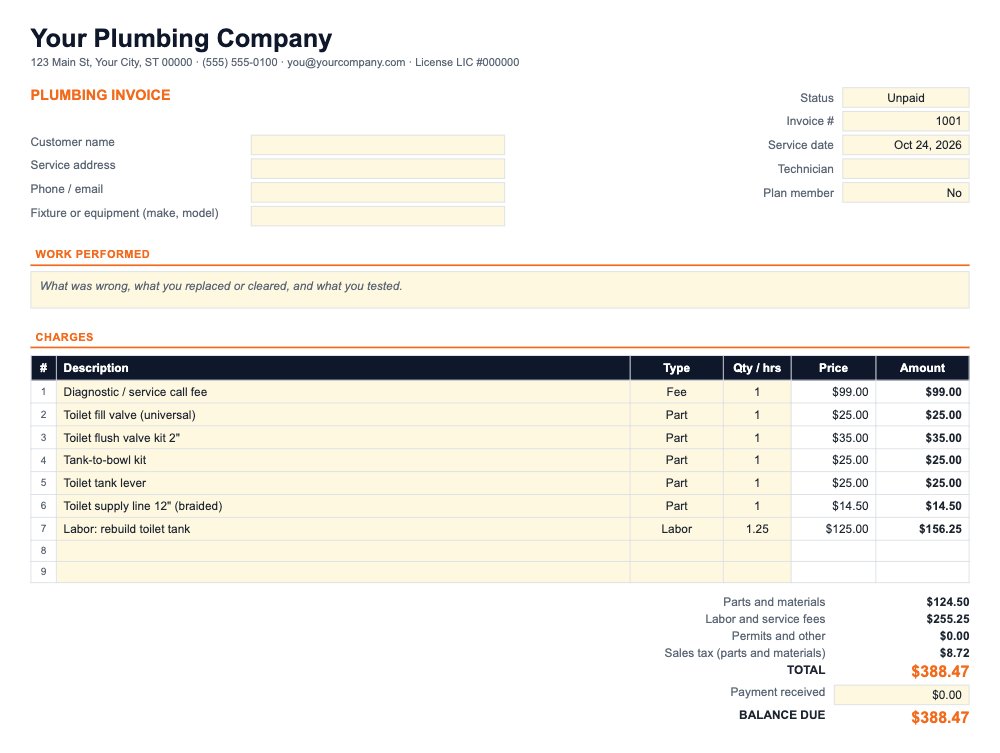
This is the invoice as it downloads: the starting Settings ($99 diagnostic fee, $125 an hour, 7% sales tax) and a toilet tank rebuild with five parts at retail-level costs and an hour and a quarter on site.
The margin beside the total reads 33%: $379.75 before tax against $252.75 counted as cost ($99 fee at full value, $45 of parts, 1.25 hours at $87). The fee is counted as a cost, so the real margin on the call is higher.
The parts and hours match the "Rebuild toilet tank" line in the plumbing price book. Charged by time and materials it comes to $280.75 before the fee and tax; the book's flat price is $289 because flat prices are rounded up to end in 9.
Why a sliding scale: trade guidance on parts markup runs from a few times cost on small parts to 30-40% on big equipment. SubcontractorHub's 2026 flat-rate guide puts parts under $25 at 4-5 times cost and parts over $1,000 at 1.5-1.8 times; Plumber magazine gives 50-75% on mid-priced items and 25-40% on big-ticket ones. One flat 50% under-prices small-part repairs. The plumbing markup chart has the full breakdown.
Plumbing Invoice Template FAQ
How does the plumbing invoice template price parts?
You type what the part cost you and the template prices it on a sliding scale: about 3 times cost for a $2 part, 2.5 times at $25, double at $100, 1.6 times at $500 and 1.3 times at $5,000, with costs in between read from the curve. Prices are rounded to the nearest 50 cents under $50, the nearest dollar under $500 and the nearest $5 above. These are the same multipliers as our free plumbing price book, so a part prices the same in both.
Will the customer see what I paid for parts?
Not on the printout. The invoice prints description, type, quantity, price and amount. Your cost, the markup and the margin are typed and calculated in columns to the right of the print area, so a printout or PDF never shows them. The spreadsheet file itself still holds them, so send the customer a PDF, not the file.
Can I use one flat markup instead of the sliding scale?
Yes. On the Settings tab, set every multiplier to the same number: 1.5 for a 50% markup, 2 for 100%. To change one line only, type a markup over that line's Markup cell on the Invoice tab.
How do I bill an after-hours or emergency call?
Use the After-hours type for the labor line and leave the rate blank. It bills at the after-hours rate from Settings ($190 an hour to start). The diagnostic fee line stays as it is unless you charge a different fee at night, in which case type that fee as the line's rate.
Which lines are taxed?
Part and Pipe lines only, at the rate on Settings (7% to start). Fee, Labor, After-hours, Permit and Other lines are not taxed. Whether a plumber charges sales tax on repair parts depends on the state, so set the rate your state requires, or 0% if you don't collect it.
What if I credit the diagnostic fee toward the repair?
Set the fee line's quantity to 0 and it drops out of the total. If you show the credit on the invoice instead, leave the fee in and add an Other line with a negative amount as its rate.
Related Guides and Calculators
Rather Invoice From Your Phone?
EstimateKit quotes from your plumbing price book, gets the customer's approval on their phone, and turns the job into an invoice they can pay online. $49 a month for the whole crew, 14-day free trial, no card.
Start Free Trial