Free AC Installation Estimate Template
For condenser and coil replacements. The workbook marks up each line from your cost, prices labor by the hour and checks your margin before the customer copy prints.
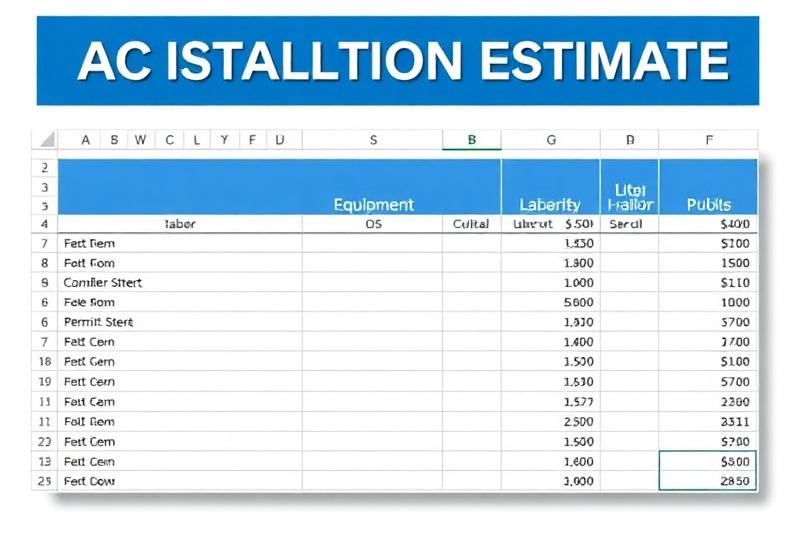
An AC Installation Estimate Template Built Around a Real Changeout
An AC replacement estimate has the same lines nearly every time: condensing unit, evaporator coil, pad, line set, disconnect and whip, refrigerant, thermostat, permit and disposal, plus the hours to pull the old system and set the new one. This template ships with those lines in place, each in the right category, so you change quantities and costs instead of starting from a blank page.
The job block has two fields a general estimate doesn't: tonnage and SEER, and existing equipment. Both print on the customer copy, so the homeowner sees what you're taking out and what's going in. To sanity-check size before you quote, the AC tonnage calculator gives a starting point; a load calculation is the real answer.
The workbook is free and downloads straight away, no email needed. It opens in Excel, Google Sheets and Apple Numbers.
What's in the AC Installation Estimate Template
Four tabs. You type in the amber cells; the white cells are protected formulas.
Start Here
Five steps in order (Settings, Estimate, labor, margin, Customer Copy) and what the cell colors mean.
Settings
Company details and license number, a $125 billable rate and an $87 labor cost to start, 7% sales tax, markups for Equipment (40%), Materials (35%), Parts (100%), Refrigerant (200%) and Other (15%), a 50% deposit, 30-day validity and a one-year labor warranty.
Estimate
Nine starter lines: 3-ton 16 SEER condensing unit, evaporator coil, condenser pad, 25 ft line set, thermostat, electrical disconnect and whip, 4 lb of R-410A, permit and old unit disposal, with room for 18. Three labor lines: remove the existing condenser and coil (2 hours), set condenser, coil and line set (5), charge, startup and test (1). Totals, deposit, balance and an internal margin check.
Customer Copy
Your header, the customer and job, tonnage and SEER, existing equipment, every line with unit price and total, labor hours and rate, totals, terms with the 60-day registration note, and a signature and date line. Costs and markup never appear here.
How to Fill In the AC Installation Estimate
- 1
Set up Settings once
Company block, your billable rate and your real labor cost, tax rate and markups. These carry into every estimate you make from the file.
- 2
Record the system
Customer, address and contact, then tonnage and SEER of the new system and a short note on the existing equipment, such as brand, age and refrigerant.
- 3
Price the condenser and coil
Enter your distributor cost on the two Equipment lines. They take the Equipment markup. If you sell matched systems at a different markup, type over it on those two lines only.
- 4
Adjust the line set and refrigerant
Use the actual run length for the line set. Refrigerant is entered by the pound, so change the quantity to the charge adjustment the job needs.
- 5
Keep pass-through costs under Other
Permit and disposal sit in the Other category at 15%, so they are priced close to cost. Add a crane, a sub or a city inspection fee the same way.
- 6
Set labor hours for the site
The starter hours suit an easy ground-level swap. Add time for a roof, an attic coil, a tight closet or a long line set.
- 7
Check the margin, then print
Look at the gross margin line before you print. Save the Customer Copy as a PDF and send that.
Worked Example: A 3-Ton AC Replacement
Example only, using the starter lines in the file and the starting Settings ($125 an hour billable, $87 cost, 7% tax, default markups). Use your own costs.
Margin check: $4,795 of items plus 8 hours at $87 ($696) is $5,491 of cost. Gross profit is $6,822.25 + $1,000 - $5,491 = $2,331.25, a 29.8% margin on the $7,822.25 price before tax (the sheet rounds it to 30%).
The sheet flags 35-50% as the target on installs, so this job is underpriced at the default markups. Raising the condenser and coil to 50% brings it to 33.3%. The HVAC markup chart shows where other contractors set equipment markup and what margin each level produces.
AC Installation Estimate Template FAQ
Can I use the AC installation estimate template for a heat pump?
Yes, with edits. The starter lines are a split-system AC, but every description, category, quantity and cost is an input. Rename the condensing unit line, change its cost, and adjust the labor hours. The math works the same way for any equipment.
Why is refrigerant marked up 200%?
That is the starting value on the Settings tab, and the note beside it gives 200-300% for R-410A to cover EPA handling and recovery. If your market or refrigerant is different, change it on Settings and every refrigerant line follows.
What warranty wording prints for the customer?
The terms say manufacturer warranty on all equipment plus your labor warranty in years from Settings (one year to start), and a second line that the manufacturer warranty applies when the equipment is registered within 60 days of installation. That line is fixed text; unprotect the Customer Copy (no password) if your brand's window is different.
Should I quote one AC or three options?
This template produces one price. If you want to show a standard, a high-efficiency and a variable-speed system side by side, the Good/Better/Best pricing template prices three tiers from your cost on one sheet.
How do I handle a longer line set?
Change the line set description and unit cost, add pounds on the refrigerant line for the extra charge, and add hours to the set condenser, coil and line set labor line. Each change flows through to the totals and the margin check.
Related Guides and Calculators
Rather Do This in an App?
EstimateKit does this in an app, $49 a month for the whole crew, 14-day free trial, no card.
Start Free Trial